
 English
 Русский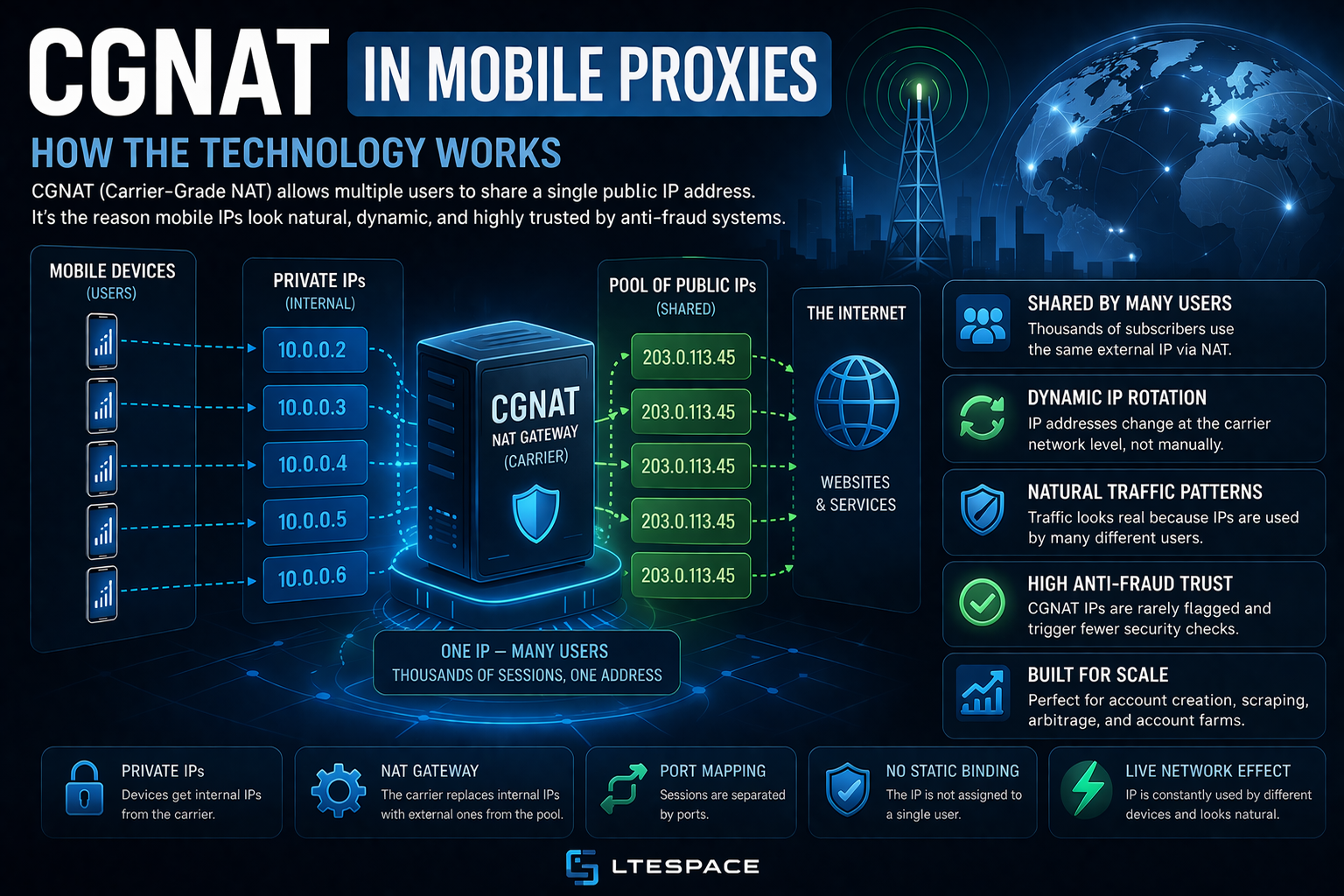
CGNAT in mobile proxies is the carrier technology that puts a crowd of subscribers behind a single external IPv4 address. This is why carrier addresses resist blocking so well: every one of them is in use by real phone owners right now. In 2026, almost every mobile carrier runs CGNAT, and knowing how it works helps set up IP rotation, sessions and account work correctly.
Why carriers use CGNAT
There are only about 4.3 billion IPv4 addresses, and the free ones ran out long ago: in Europe, the regional registry RIPE NCC handed out its last free block in November 2019. Meanwhile, a single carrier serves tens of millions of subscribers, and nearly every phone stays online all the time. Giving each device its own public address is impossible.
CGNAT (Carrier-Grade NAT) solves this. A phone receives an internal address visible only inside the carrier network and goes online via a carrier gateway holding a modest pool of external addresses. Each external address is in use by many subscribers simultaneously.
How CGNAT works: the path of a request
When a phone or modem opens a website, the request goes through four steps:
- The device receives an internal address. A dedicated range,
100.64.0.0/10, is reserved for CGNAT, though carriers also use private addresses such as10.x.x.x. - The request goes to the carrier’s CGNAT gateway.
- The gateway replaces the internal address and port with a public address from the pool and a free port, and records the internal-to-public pair in a table.
- The site’s reply arrives at the public address and port, the gateway finds the record and hands the reply to the right device.
Behind one external IP, only port numbers tell subscribers apart. An address has about 65,000 ports, and the gateway hands them out to subscribers in blocks. How many people end up behind one address depends on the carrier’s settings: typically tens or hundreds of devices at once.
One important detail: RFC 4787 recommends that gateways send all connections from one subscriber through the same public address. So while a device stays connected, its public IP usually does not change. A new address appears when the device reconnects to the network and the carrier opens a new session.
What a website sees behind CGNAT
A site sees neither the internal address of the device nor how many subscribers share the public IP. What it can see:
- the public IP address from the carrier pool;
- the ASN — the autonomous system number reveals that a cellular operator owns the range, not a server host;
- a rough location — in most cases the gateway’s city, not where the device physically is;
- the connection port — it changes from one connection to the next and reveals nothing about identity.
This has a practical consequence: mobile IP geolocation can be imprecise. A suburban modem can be placed in the neighboring big city, and a small-town modem can be mapped to its regional center. The browser time zone should match what IP check services report, not the assumed location of the modem. More on this in mobile proxies and time zone.
Why CGNAT makes mobile proxies resilient
If a site blocks a mobile IP, it locks out every subscriber behind that address — ordinary people who simply opened the site on their phones. That is why large platforms rarely ban mobile addresses for long. Instead of a ban, they show a CAPTCHA, ask for phone verification or restrict a specific account.
The reputation of a mobile address works differently too. A datacenter IP usually serves one client, and whatever bad traffic came from it stays attached to the address. A mobile IP carries traffic from many subscribers, and the address itself moves from one set of devices to another over time. A bad history fades faster on such an address. How anti-fraud systems take this into account is explained in mobile proxies and anti-fraud.
How a mobile proxy works on top of CGNAT
Nobody can connect to a device behind CGNAT from the outside: the modem has no public address or open port of its own. So a mobile proxy works the other way round. A modem with a SIM card connects to the proxy provider’s server itself and keeps that link open. The client connects to the server, the server passes the traffic to the modem, and the modem sends it to the internet through the carrier network and its CGNAT gateway.
Changing the IP in this setup means reconnecting the modem to the carrier network. The modem registers in the network again, gets a new session, and the gateway assigns it another public address from the pool. LTESpace offers three ways to do this:
- private channel — the modem reconnects through a link whenever the user needs it;
- shared channel — the address changes on its own by a timer; intervals of 2 and 5 minutes are described for Russian plans;
- multiport — each new connection goes out through a different IP from the carrier pool; the plan is available for Russian carriers, see multiport mobile proxies.
How these methods affect sessions and accounts is covered in the guide to mobile proxies with rotation.
How to check that an address is mobile
The check takes a minute. Open any IP check service through the proxy and look at three fields:
- provider or ASN — the field must name a cellular operator; a hosting firm or datacenter here means something is wrong;
- connection type — plenty of lookup tools tag carrier ranges with a mobile or cellular flag;
- location — the country has to match the plan, while the city may be off because of where the gateway stands.
A home ISP or a server host in that field usually means the software bypasses the proxy, so its settings need a second look.
CGNAT limitations worth knowing
The technology has a flip side:
- shared reputation — if another subscriber behind the same address sends spam or runs bots, the proxy may get a CAPTCHA too;
- repeated addresses — a carrier’s regional pool is limited, so after an IP change the modem sometimes receives an address it already had before;
- imprecise geography — the site sees the gateway city, not the actual location of the modem;
- outbound connections only — a mobile IP cannot accept incoming connections, so it is no use for a server or hosting;
- IPv6 bypasses CGNAT — many carriers give phones IPv6 as well, and there each device has its own address with no shared pool. If a browser or program goes online over IPv6 around the proxy, the site sees a completely different address.
How to account for CGNAT in practice
- One account, one session, one address. Sign-in, actions and sign-out happen without an IP change halfway through.
- IP change between accounts. Before signing in to the next account, change the address and confirm that it is actually new.
- Time zone by the facts. Set it from what the IP check service shows, not from the city in the plan description.
- Browser fingerprint handled separately. CGNAT hides the address, not the browser. Several accounts need separate profiles, as described in the guide to account registration with mobile proxies.
- The right protocol for the job. HTTPS suits browsers and most software, while SOCKS5 handles other traffic. The comparison is in HTTP, HTTPS and SOCKS5 proxies.
How a mobile address behind CGNAT differs from a rotating datacenter IPv4 address is explained in rotating IPv4 proxies vs mobile proxies.
Conclusion
CGNAT in mobile proxies explains the extra trust websites give to carrier addresses. With a crowd of real subscribers behind every external IP, a site can neither pin the address on one person nor keep it banned for long. A new address does not appear on its own, though: it comes with a reconnection of the modem to the network. That leads to simple working rules: keep the address for the whole session, change it between accounts and match the time zone to the actual geolocation. A channel with IP change by link or by timer can be chosen in LTESpace pricing.